It’s been a good year for Star Wars gaming

It’s been such a good year for Star Wars gaming, and it has made my life much, much more interesting.

I should start from scratch.

Back in 2022, after watching the first season of Andor, I realized that I had the need to enjoy more Star Wars content. Alas, there were no new shows or movies coming up. I could (and of course I do) watch all existing 7 movies (Original, Prequels and Rogue One; and not Disney’s fan fiction), all of The Clone Wars episodes and some of the books (which frankly speaking I am very much lacking behind).

But wanted a different medium…

The search for a different medium started a rabbit hole which brought me back to gaming.

First, I found the most bestest MMORPG ever, Star Wars: The Old Republic. SWTOR for short. But oh no, it works only on Windows? Fear not! I installed Linux on a MacBook Pro 2015 and thanks to Steam’s Proton I was able to install and run the game.

The obsession of playing that game with better graphics, and everywhere, made me get a Steam Deck OLED, which is probably one of the best investments in my life.

And I ended up building a gaming PC (before the AI RAM crisis) in order to play more games.

I got invested into SWTOR so much that I deeply participated in the Mac beta Launcher and created, joined and befriended guilds.

This year, not so long ago, another Star Wars game has been launched: Star Wars Zero Company, or ZCOM for short. Yes, it’s basically an X-Com style game with a breath of Star Wars in it. I have not finished the campaign yet, but planning to do that by end of this year.

Last month also saw the launch of Star Wars Galactic Racer, a racing game with awesome Star Wars stories, a multiplayer (alas not split-screen) and some of the best (and optimized) graphics I’ve ever seen in a racing game.

But we’re not done yet! This year Broadsword announced that they are planning the release of the next expansion, and sometime this (or next) week, they are releasing a test client for DirectX 12.

And don’t get me started on the awesome community! It was just 6 months ago when we had the Battlefront II resurgence, with tens of thousands of players joining in!

In short, as a gamer and as a life-long Star Wars fan, it’s been an amazing year and I’m looking forward to 2027 to see what the community and the gaming industry is going to surprise us with.

The only thing I’m sad about is still the game development economics: I cannot believe that even when a successful game is released with large number of players, people get fired. Every publisher and studio is expecting their game to be as massive as WoW, to make as much money as Destiny, or to be as complex as… oh shit I ran out of games that I care about. But having 1 million copies sold is an amazing number, yet, somehow, the economics don’t work.

Anyways, I need to finish my work so I can play some SWTOR this weekend.

That’s all folks…

(Written on a BlackBerry Classic)
Setting up a new zone in BIND with DNSSEC

I finally decided to get a new domain (another week, another domain…), but I completely forgot how to use BIND’s inline signing to sign domains.

In order to not make the same mistake as today (forgetting things), I thought it would be a cool idea to document as I go.

First things first, in named.conf I add the zone configuration

zone "antranig.am" {
  type master;
  file "/usr/local/etc/namedb/pri/antranig.am/antranig.am.zone";
  allow-query { any; };
  allow-transfer { he; ns2; };
  inline-signing yes;
  dnssec-policy nsec3;
  key-directory "/usr/local/etc/namedb/keys/antranig.am";
};

and then create the directories which I need

# mkdir -p /usr/local/etc/namedb/pri/antranig.am /usr/local/etc/namedb/keys/antranig.am

and finally write the zone file itself

$TTL 30m
$ORIGIN antranig.am.
@   SOA   ns1.bind.am.  root.bsd.am. (
    2026110600  ; serial
    1h          ; refresh
    5m          ; retry
    1d          ; expire
    1h          ; minimum
)

    NS    ns1.bind.am.
    NS    ns2.bind.am.
    A     37.157.221.130
    AAAA  2001:470:1f15:e4::80

Finally I set the right permissions

# chown -R bind:bind  /usr/local/etc/namedb/pri/antranig.am /usr/local/etc/namedb/keys/antranig.am

I can now check the BIND configuration

# named-checkconf -z >/dev/null && echo 'all good' || echo 'something went wrong'
all good

Okay, time to reload the server

# service named restart
Stopping named.
Waiting for PIDS: 56916.
Starting named.

Now I can check if DNSSEC is working

# rndc dnssec -status antranig.am
dnssec-policy: nsec3
current time:  Fri Nov  6 14:23:25 2026

key: 22548 (ECDSAP256SHA256), CSK
  published:      yes - since Fri Nov  6 13:53:12 2026
  key signing:    yes - since Fri Nov  6 13:53:12 2026
  zone signing:   yes - since Fri Nov  6 13:53:12 2026

  No rollover scheduled
  - goal:           omnipresent
  - dnskey:         rumoured
  - ds:             hidden
  - zone rrsig:     rumoured
  - key rrsig:      rumoured

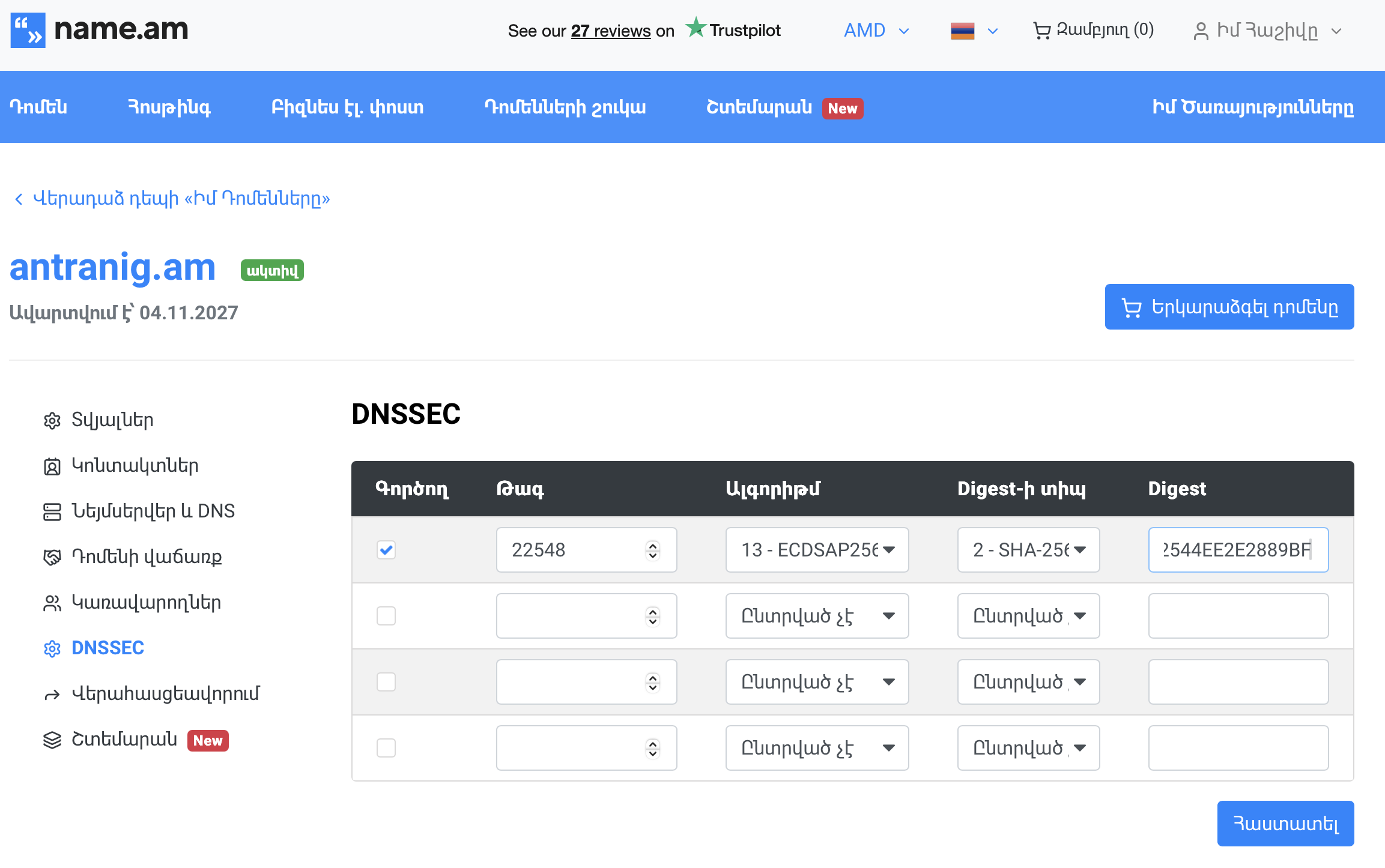
Aha! the goal is omnipresent but the DS is hidden (not upstreamed), however the DNSKEY is rumoured, so I can grab it and get the DS RR from it

# drill DNSKEY antranig.am | dnssec-dsfromkey -f - antranig.am
antranig.am. IN DS 22548 13 2 A478619737C1E667800440FD892D565D9E92D0533364880CFB2544EE2E2889BF

Perfect, now I’ll publish that at AMNIC

And time to check the WHOIS

   Domain name: antranig.am
   Registrar:   name (NAME LLC)
   Status:      active

   Registrant:
      Domain Privacy
      NAME.AM
      domain registration, domain marketplace, backorder, hosting etc.,  -
      AM

   Private contact:
      PRIVATE REGISTRATION
      ---------------------
      NAME.AM
      domain registration, domain marketplace, backorder, hosting etc., -
      AM
      private@name.am
      +37460660099

   DNS servers (zone signed, 1 DS record):
      ns1.bind.am
      ns2.bind.am

   Registered:    2026-11-04
   Last modified: 2026-11-06
   Expires:       2027-11-04

Good! but the WHOIS gets updated faster than the actual AM zone, so I can check that too, in ~10 minutes, when it gets updated, hopefully… I’m gonna make some tea.

I’m back!

# drill -Q @ns-pri.nic.am. DS antranig.am
22548 13 2 a478619737c1e667800440fd892d565d9e92d0533364880cfb2544ee2e2889bf

Okay, so the DS is published, let’s see if the verification is working…

# drill -S antranig.am
;; Number of trusted keys: 2
;; Chasing: antranig.am. A


DNSSEC Trust tree:
antranig.am. (A)
|---antranig.am. (DNSKEY keytag: 22548 alg: 13 flags: 257)
    |---antranig.am. (DS keytag: 22548 digest type: 2)
        |---am. (DNSKEY keytag: 62484 alg: 13 flags: 256)
            |---am. (DNSKEY keytag: 39902 alg: 13 flags: 257)
            |---am. (DS keytag: 39902 digest type: 2)
                |---. (DNSKEY keytag: 8763 alg: 8 flags: 256)
                    |---. (DNSKEY keytag: 38696 alg: 8 flags: 257)
;; Chase successful

Worked like a charm!

Now we tell BIND that the DS has been published

root@bsd:/usr/local/etc/namedb # rndc dnssec -checkds published antranig.am
Marked DS as published since 06-Nov-2026 14:34:50.000
root@bsd:/usr/local/etc/namedb # rndc dnssec -status antranig.am
dnssec-policy: nsec3
current time:  Fri Nov  6 14:34:55 2026

key: 22548 (ECDSAP256SHA256), CSK
  published:      yes - since Fri Nov  6 13:53:12 2026
  key signing:    yes - since Fri Nov  6 13:53:12 2026
  zone signing:   yes - since Fri Nov  6 13:53:12 2026

  No rollover scheduled
  - goal:           omnipresent
  - dnskey:         rumoured
  - ds:             rumoured
  - zone rrsig:     rumoured
  - key rrsig:      rumoured

Good! now I can start using my new domain 🙂

(Configuring the secondary server is outside the scope of this blog post, but if you’re here, I assume you already know how to do that 😉 )

That’s all folks…

TIL zfs-userspace(8)

There are 141 tips in the FreeBSD tips file that is displayed by fortune every time you log into a FreeBSD system.

root@geonosis:~ #  grep -E '^%' /usr/share/games/fortune/freebsd-tips | wc -l
     141

Most of the time, I know the tips very well. Sometime, however, I do learn a new thing.

Today I Learned that

To set a quota of 10 GB for the user named foo on a ZFS dataset, run the
following command:

# zfs set userquota@foo=10G pool/home/foo

The zfs userspace command can display the quota and current space usage:

# zfs userspace pool/home/foo

To unset a quota, assign "none" as the value.
                -- Benedict Reuschling <bcr@FreeBSD.org>

This is actually two tips in one. First, is the userquota in a filesystem, and the second one is how to see these quotas, which I had no idea about.

So I tried running it on one of my larger systems

root@geonosis:~ # zfs list  genomic/abi/proj/cfdna
NAME                     USED  AVAIL  REFER  MOUNTPOINT
genomic/abi/proj/cfdna  39.9T  7.10T  39.9T  /mnt/proj/cfdna
root@geonosis:~ # zfs userspace -S used genomic/abi/proj/cfdna
TYPE        NAME    USED  QUOTA  OBJUSED  OBJQUOTA
POSIX User  10039  22.1T   none    78.6K      none
POSIX User  10017  6.64T   none     102K      none
POSIX User  10048  6.35T   none     110K      none
POSIX User  10052  4.51T   none    7.11K      none
POSIX User  10011   326G   none    1.34K      none
POSIX User  10065  1.42G   none    14.7K      none
POSIX User  10012  51.3M   none    1.77K      none
POSIX User  10001   125K   none       13      none
POSIX User  10018  38.1K   none        3      none
POSIX User  10031  1.50K   none        3      none
POSIX User  root    512B   none        1      none

I don’t integrate our storage systems with LDAP, instead we just use the UIDs in permissions, but I can check who that is on another system.

antranigv@ssh-02:~$ id -nu 10039
anahit

Time to inform anahit that she has the record for most used storage in our largest project 🙂

That’s all folks…

Antranig Vartanian

January 14, 2026

I can’t sleep. Let me rephrase that — I am so tired, that I can’t even sleep. I have spent the last two weeks upgrading and reconfiguring the infrastructure at ABI, while at the rest of my time, trying to answer the question “what do I need to be independent on the internet?”. I still don’t have a complete answer, but something is moving towards that direction. I applied for an ASN, and did the payments, now just waiting for my paperwork to go through. Let’s see how it goes.

The last couple of months have been really interesting. I start seeing changes that I both like and hate at the same time. And well, what should I do if I can’t sleep? blog about these changes.

These are not good always good changes, like I’ve said, some of them I do indeed hate, but most of them should be fine.

Last year I got a Valve Steam Deck. Actually, I kind of “won” a Steam Deck? One of our projects was over-budget, and my friend joked with the vendor saying “can we get a PS5? we’re redoing the office”. The reply was as expected — “no, that’s categorized in the Gaming Console section, I can give you anything you want in the computer section”. So I asked, as a joke, again, “can I get a Steam Deck if you have any?”, and to my surprise, the vendor say “actually yes, and I think it’s categorized in the PC section”. It was. I got it. Totally love it.

This change is nice, if you have it under control. Gaming for 12 hours a day? Not a good thing to do, unless its Sunday, and you have no plans. But gaming every day for 12 hours? Well, some people, I’m sure, have the luxury of doing that, but not me. Even if I had the luxury, my brain would crave for a challenge, on a Unix system — a bug to be fixed, a setup to be complete, a research to be read.

But I have to confess — going to bed every day, knowing that I will be using the Steam Deck to play a game, instead of scrolling on not-very-social-media, is one of the best changes in my life.

You’d think a computer like the Steam Deck — portable, tiny, with mid-size fans — would not be very powerful, but oh my how far have we become. I can play all of the games that I was never able to play on my top-of-the-line laptop from back in 2015, and I can even play some of the games I was able to play on my PlayStation 4 Pro from just less than 5 years ago.

I mean, sure, we’re a Unix household. The computers are a Mac, the TV is from Apple, the mobiles are iPhone, the routers are OpenBSD, the servers are FreeBSD, and I’m sure I have NetBSD and illumos somewhere, but seeing Linux do its thing as a gaming machine is absolutely fascinating.

Not only I can play my favorite MMORPG game — Star Wars: The Old Republic — in a pretty high quality, but I can even play Star Wars Battlefront II while I’m on the toilet in the taxi. And no, I don’t mean Battlefront 2 from 2005, I mean the one from 20… something.

You’d think that things are going well, but oh no, the bad changes can become terrible if you don’t get them under control, and I have not been able to get them under control for a while.

Not so long ago, I started using the GTD methodology as a way to organize my… life. It was all going very well, until it just didn’t I forgot to do my weekly reviews for weeks, and then I started forgetting to do my monthly reviews for months. I am still not sure what happened there, but I started feeling like I lost control of my life. Luckily, my brain started going into “auto-pilot” mode and just doing the actual daily things that I needed to do. Follow up with a customer, call a friend, boot up the game for 30 mins, reply to that SMS as soon as you got it. Nothing… major, nothing… new. Just an auto-pilot to keep things running.

Where does that get us to? Well, I stopped blogging, I stopped checking up with my projects, I stopped even to read books for a while. Actually, forget books, I even forgot to listen to the podcast that I care about. I forgot to upload pictures to my photo blogs, I stopped caring about my home servers.

It’s almost mid-night, and I haven’t had a proper sleep for the last week. Yes, I am proud of the new setup, yes, I will document everything I did (even tho I never do, and haven’t, for years now), but for now, all I need, is just a bit of sleep, a proper wake up, and a good morning coffee.

And if I can follow that with a morning, more of a happy blog post, then I can finally say “I’m back baby”.

Good night.

Antranig Vartanian

October 9, 2025

I started getting into retro computing again, but this time also for phones, so I’m blogging from a BlackBerry phone 🙂

Let’s see if it works!

Antranig Vartanian

September 21, 2025

There’s a lot of work that needs to be done on Jailer.

To start with, I have finally decided on the release model. The main development branch will be main, similar to FreeBSD, and then the releases will be tagged.

I’m not sure how I feel about branches, as I don’t want to have any kind of LTS versions, but I might need to understand if there’s anything missing in FreeBSD that I would need.

Another problem that I have right now is the fact that we don’t have a Port. I’m not happy with Jailer enough to make a Port for it, but maybe in the coming days.

  • Fix the Git stuff that I don’t care about but I should
  • Create a stable non-development version/tag
  • Create more lists like this, because, let’s be honest, no one can work without lists.

I do wonder if I can pull an all nighter and finish everything that I hope to finish. Lets see.

Antranig Vartanian

July 19, 2025

Sometimes all I need to do is

sudo tmutil listlocalsnapshots / \
  | grep TimeMachine \
  | cut -d . -f 4 \
  |  xargs -I% sudo tmutil deletelocalsnapshots %

And suddenly I have like 70GB of more storage on my Mac.

I wish macOS was less… black magic-y.

Antranig Vartanian

July 7, 2025

Sometimes, when I have a long running process on my computer, like scp, rsync or curl I need to know when it’s done, so I don’t check the terminal every minute. That’s when I realized that this is a perfect fit for Apple Script and pwait.

Basically, it looks something like this:

pwait `pgrep xargs` \
  && osascript -e \
    'display notification "Extraction Done" with title "large xargs"'

Now I can go back to work, and I don’t have to check if the job is done every minute. A notification will appear when it’s done.

For remote jobs, I have realized, that I can send a notification to myself, kind of like a self-hosted Pushover, using XMPP, I don’t want to go into the details, but that seems like to be a good solution as well. Maybe I should just use Pushover anyway.

Analyzing FreeBSD’s Package Mirror GeoDNS

One of the things that makes FreeBSD an amazing operating system is its package manager, pkg(8). Many people will keep arguing with me saying that apt or pacman is better, but pkg has some of the best features out there. Don’t even get me started on number of packages. A friend was telling me “but how can I use FreeBSD when you have 1/3rd number of packages that Debian has?”. Again, this is a lie. While Debian has 80K packages, each software is divided into -doc and -dev, while on FreeBSD a simple pkg install will install everything that a package needs.

But let’s not talk about how awesome FreeBSD’s pkg is, let’s talk about it’s issues.

Couple of years ago, I noticed that downloading from FreeBSD package mirror was veeeeeery slow. Turns out that based on GeoDNS Armenia was connecting to the South African package mirror pkg0.jinx.FreeBSD.org by default.

Lucky for me, there was a package to help you figure out which one is fastest for you, named fastest_pkg. I ran it and I learned that the Frankfurt package mirror was the fastest for me.

Initially, I changed the config in FreeBSD.conf as recommended by fastest_pkg, but I’m not a single server guy, I have dozens of hosts with hundreds of jails.

Solution? I asked the Cluster Admins to set Armenia’s GeoDNS to pkg0.fra.FreeBSD.org.

But servers come and go, and the Frankfurt server got decommissioned a while back. Luckily the project now has a server in… Sweden!

But my download speed is slow. Somehow Armenia defaulted back to South Africa.

Is this an issue for me, or is this an issue for everybody?

(Sidenote: turns out fastest_pkg has been broken for a while, ever since pkg moved to a new package format, so we also made a patch and submitted a PR)

During today’s FreeBSD “Ask the experts: AMA” we used RIPE Atlas to measure the speeds from all around the world, to all package mirror hosts.

All of the measurements can be found here.

So, here’s the goal

  • Measure from around the world to all of the package mirror hosts (done).
  • Measure from around the world to pkg.FreeBSD.org to get the default GeoDNS host for each area/country/network (in progress, recurring every 6 hours for the next 6 days)
  • Find mis-configurations between “fastest” and “default” (TODO).

While the big measurements is still running I tried to use my eyes to see if there’s anything GREEN (aka fast connection) in direct package mirror host measurements whilst being YELLOW/RED (aka bad connection) when connecting to pkg.FreeBSD.org.

Unsurprisingly, we found one! It was in Mombasa, Kenya.

Here’s what it looks like while connecting directly:

{
  "fw": 5080,
  "mver": "2.6.2",
  "lts": 25,
  "dst_name": "pkg0.jinx.freebsd.org",
  "ttr": 10639.830509,
  "af": 4,
  "dst_addr": "196.10.53.168",
  "src_addr": "160.119.216.205",
  "proto": "ICMP",
  "ttl": 59,
  "size": 1000,
  "result": [
    {
      "rtt": 47.434297
    },
    {
      "rtt": 47.39957
    },
    {
      "rtt": 47.412379
    },
    {
      "rtt": 47.369089
    },
    {
      "rtt": 47.851894
    }
  ],
  "dup": 0,
  "rcvd": 5,
  "sent": 5,
  "min": 47.369089,
  "max": 47.851894,
  "avg": 47.493445799999996,
  "msm_id": 110487154,
  "prb_id": 22215,
  "timestamp": 1750269643,
  "msm_name": "Ping",
  "from": "160.119.216.205",
  "type": "ping",
  "group_id": 110487154,
  "step": null,
  "stored_timestamp": 1750269644
}

And here it is via GeoDNS’s defaults:

{
  "fw": 5080,
  "mver": "2.6.2",
  "lts": 10,
  "dst_name": "pkg.freebsd.org",
  "ttr": 10465.87807,
  "af": 4,
  "dst_addr": "173.228.147.98",
  "src_addr": "160.119.216.205",
  "proto": "ICMP",
  "ttl": 52,
  "size": 1000,
  "result": [
    {
      "rtt": 240.19025
    },
    {
      "rtt": 244.967071
    },
    {
      "rtt": 236.466414
    },
    {
      "rtt": 238.189775
    },
    {
      "rtt": 233.570938
    }
  ],
  "dup": 0,
  "rcvd": 5,
  "sent": 5,
  "min": 233.570938,
  "max": 244.967071,
  "avg": 238.6768896,
  "msm_id": 110489920,
  "prb_id": 22215,
  "timestamp": 1750270943,
  "msm_name": "Ping",
  "from": "160.119.216.205",
  "type": "ping",
  "group_id": 110489920,
  "step": null,
  "stored_timestamp": 1750270944
}

Clearly, it’s set to pkg0.chi.freebsd.org (173.228.147.98) by default. That’s Chicago. That’s halfway around the world. It took it 238ms on average. While it took the same probe 47ms on average when connecting to pkg0.jinx.freebsd.org directly.

Clearly, I’m not the only one.

Hopefully after collecting data for 6 days, we can start analyzing and improving the GeoDNS setup that we have.

A good suggestion from crest was to have a pkg plugin that does the work of fastest_pkg on the fly. We’ll try that one day.

If anyone is interested in helping me out, feel free to contact me over email, IRC or Discord.

That’s all folks…